What Is a .env File? Plain-English Guide + .env.example
A .env file stores your app's settings and secrets outside the code. Learn how it works in Laravel, Node and Python, and why .env.example matters.
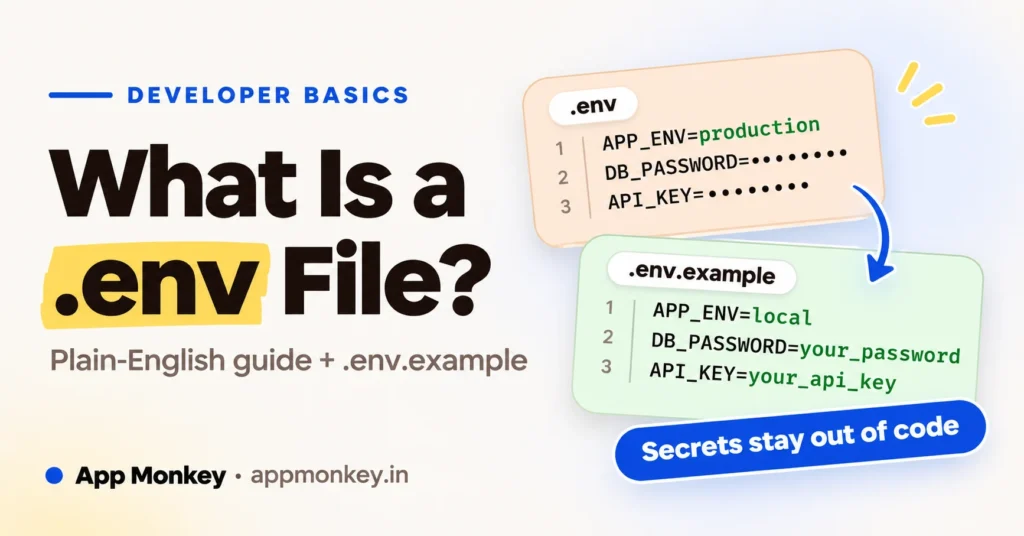
Open almost any Laravel, Node or Python project and you'll find a small file called .env sitting in the root folder. It's easy to overlook. It's also the file that holds your database password, your API keys and the switch that decides how much your app tells visitors when something breaks.
That's why it's worth five minutes of your attention. The most common way to get it wrong is to put it on GitHub, and that mistake is much easier to make than to undo.
This guide covers what a .env file is, how your app reads it, what belongs inside, and why a second file called .env.example exists. No setup needed, just a project you can open.
What is a .env file?
A .env file (say "dot env") is a plain text file of settings, one per line, written as NAME=value:
APP_NAME="My Shop"
APP_ENV=local
APP_DEBUG=true
DB_DATABASE=shop
DB_USERNAME=root
DB_PASSWORD=not-a-real-password
MAIL_API_KEY=abc123
Each line is an environment variable: a value that lives outside your code and can change depending on where the app runs. Your laptop, a test server and the live site all run the same code, but they shouldn't share a database password. The .env file is how each one gets its own.
The idea comes from the Twelve-Factor App guidelines, which say config should be kept strictly separate from code. Their test is a good one: could you publish your codebase right now without leaking a single credential? If the answer is no, something that belongs in .env is probably sitting in your code.
The leading dot makes it a hidden file on Mac and Linux, so you may not see it until you switch on hidden files in your editor or file manager.
One more thing: there is no official standard for the format. Node's own documentation says .env files have no formal specification, so each tool sets its own rules. They agree on the basics, and we'll get to the differences that bite.
How does your app read it?
It doesn't, not on its own. A .env file is just text until something loads it. At startup, a framework or a small library reads the file and copies each value into the app's environment. After that, your code asks for values by name.
| Stack | Who loads the file | How your code reads a value |
|---|---|---|
| Laravel | The framework, automatically | env('DB_HOST') inside config files, then config('database.default') everywhere else |
| Node.js | The --env-file flag (Node 20.6 and later) | process.env.DB_HOST |
| Python | The python-dotenv package | os.getenv("DB_HOST") |
In practice it looks like this.
Laravel reads it inside a config file, with a fallback in case the variable is missing:
'debug' => (bool) env('APP_DEBUG', false),Node loads it when you start the process:
node --env-file=.env app.jsconsole.log(process.env.PORT); // "3000", always a stringPython loads it with python-dotenv:
from dotenv import load_dotenv
import os

load_dotenv()
db_password = os.getenv("DB_PASSWORD")
There's a useful rule that holds in all three: a real environment variable beats the file. Laravel's docs say any variable in .env can be overridden by server-level or system-level variables. Node's docs say the environment takes precedence over the file, and python-dotenv keeps existing variables unless you pass override=True. So your hosting dashboard can quietly overrule what's in the file, which is handy and occasionally confusing.
What belongs in a .env file (and what doesn't)
A simple test: does this value change between machines, or would it be embarrassing in public? If yes to either, it goes in .env.
Typical residents:
- Database host, name, username and password
- API keys and secrets for outside services, such as payments, email and maps
- Mail server credentials
- The app's mode, like
APP_ENV=localorAPP_ENV=production, and the debug switch - Anything that differs per environment, like a site URL or a storage bucket name
And what stays out:
- Values that are identical everywhere and not secret. Put them in code or a normal config file.
- Your customers' data. A .env file holds settings for the app, not records for the database.
- Long blobs of text or whole certificates, unless you have no other option. They get awkward fast.
If you're not sure what an API key even is, our plain-English guide to APIs covers it.
The formatting rules that trip people up
The format looks trivial, and then one stray space costs you an hour. These are the ones worth knowing:
- Write
KEY=valuewith no spaces around the equals sign. Some parsers forgive spaces, but it's the form you'll see in most guides and the one least likely to surprise a tool. - Quote values that contain spaces. Laravel's docs show
APP_NAME="My Application"for exactly this reason. - Comments start with
#. Inside quotes, a#is just a character, so"abc#123"stays intact in Node. - Everything is a string. In Node,
DEBUG=falsegives you the text"false", and any non-empty string is truthy, soif (process.env.DEBUG)runs anyway. Compare against the text (=== "true") instead. Laravel is friendlier here: it turnstrue,false,nullandemptyinto the real values for you. - Don't share a file between tools and assume it behaves the same. Node, python-dotenv and Laravel each have their own parsing rules, particularly around multi-line values and
${VAR}expansion.
So what is .env.example?
Here's the catch with keeping .env out of version control: a teammate clones your project and finds no .env at all. They have no idea which variables the app needs, let alone what to put in them.
.env.example is the fix. It's a copy of your .env with the same variable names but fake or empty values, and this one you do commit. Laravel's docs describe it as a file that lists the variables your app needs, with placeholder values so a new developer can see them at a glance.
APP_NAME="My Shop"
APP_ENV=local
APP_DEBUG=true
DB_DATABASE=
DB_USERNAME=
DB_PASSWORD=
MAIL_API_KEY=your-key-here
Setting up a fresh clone then takes two steps:
- Copy it:
cp .env.example .env - Fill in the real values (a new Laravel project also needs its app key: run
php artisan key:generate)
Laravel does the copy for you when you create a new project. Other stacks leave it to you, which is why a README line saying "copy .env.example to .env" saves everyone a question.
A good .env.example follows a few habits:
- List every variable the app needs. If the code reads it, the example file shows it.
- Never put a real secret in it. Use empty values or obvious placeholders like
your-key-here. - Add a short comment when a value isn't obvious, such as where to find the key.
- Update it in the same commit that adds a new variable. Otherwise a teammate pulls your code, the app breaks, and the cause is a missing line they can't see.
There's nothing special about the name, either. Git doesn't treat .env.example any differently from any other file. It's simply the convention everybody has agreed to follow.
Keep your .env out of Git
This is the part that matters most. Laravel's docs put it plainly: don't commit your .env file, because it's a security risk if an intruder gains access to your source control repository.
The fix is one line in a file named .gitignore, in the project root:
.envMany starter projects already include it, but check yours. Don't assume.
Already committed it? Adding the line now won't help. Git's own manual says files already tracked are not affected by new ignore patterns. You need to untrack the file first:
git rm --cached .env
echo '.env' >> .gitignore
git commit -m "Stop tracking .env"
Then the less fun part: the file is still in your Git history, so treat every secret in it as exposed. GitHub's advice is to rotate the affected credential immediately. Once it's revoked, scrubbing history is slow and often unnecessary. So generate a new database password and new API keys, and update them where the app runs. Public repositories get GitHub's secret scanning for free, but scanners find leaks after they happen. They don't prevent them.
If your team needs to share the real values in the repository, Laravel has a built-in option: php artisan env:encrypt produces an .env.encrypted file that can be committed safely, and the decryption key goes in a password manager, never in the repo.
The Laravel gotcha: .env stops loading when config is cached
This one catches almost everyone who deploys a Laravel app. When you run php artisan config:cache, Laravel saves all its configuration into one fast file. From then on, the framework no longer loads your .env file on requests or Artisan commands, so env() can only see real system-level variables.
The symptom is a value that works on your laptop and comes back empty in production. The fix is a habit: call env() only inside your config files, and use config('some.key') everywhere else in the app. If you're tuning a Laravel app for speed, our Laravel performance guide covers where caching fits in.
Common mistakes (and quick fixes)
- "I changed .env and nothing happened." The file is read when the app starts. Restart the dev server or the Node process. In Laravel with cached config, clear the cache or re-run the cache command.
- Committing the real file. See above: untrack it, rotate every secret.
- Emailing or messaging the file around. Chat and email keep copies forever. Use a password manager, or Laravel's encrypted env files.
- Treating .env as a vault for frontend code. If a value gets bundled into JavaScript that runs in the browser, anyone can read it, no matter which file it came from. Keep real secrets on the server.
- Letting the web server serve it. The file should sit outside the public folder your site is served from. Try visiting
yoursite.com/.envafter deploying. You want an error, not your passwords. - Forgetting to update .env.example. A new variable in the code with no matching line in the example file is a trap for the next person.
FAQ
Is a .env file the same as environment variables? Not quite. The file is a convenient way to set them, mainly in development. The real variables can come from your server, your hosting dashboard or your system, and they win when both exist.
Do I need a .env file in production? No. Many hosts let you set environment variables in a dashboard, and the app reads them just the same. A .env file on the server also works. Keep it out of Git and out of the public web root either way.
Can I have more than one .env file? Yes. Laravel will load .env.[APP_ENV] (for example .env.staging) if it exists, and falls back to .env if not. Node accepts several --env-file flags, and later files override earlier ones.
What's the difference between .env and .env.example? .env holds your real values and stays private. .env.example holds the same names with placeholder values and gets committed so everyone knows what to fill in.
Do I have to write it by hand? No. Our free .env file generator builds a starter file for you, and then you swap in your own values.
Wrapping up
A .env file is a small, boring text file with one big job: keeping your settings and secrets separate from your code. Keep it out of Git, give your team a .env.example, and use real environment variables on the server. Do that, and you've avoided most of the ways this goes wrong.
Want to understand where your app's code ends and the framework begins? Our plain-English guide to frameworks is a good next read.



Join the conversation
What do you think?
Write a comment
No comments yet. Be the first to share a thought.