Laravel Performance Optimization: The Fixes That Matter
Speed up a slow Laravel app: measure first, then fix N+1 queries, add indexes, cache, queue slow work and optimize deploys, with code from the docs.
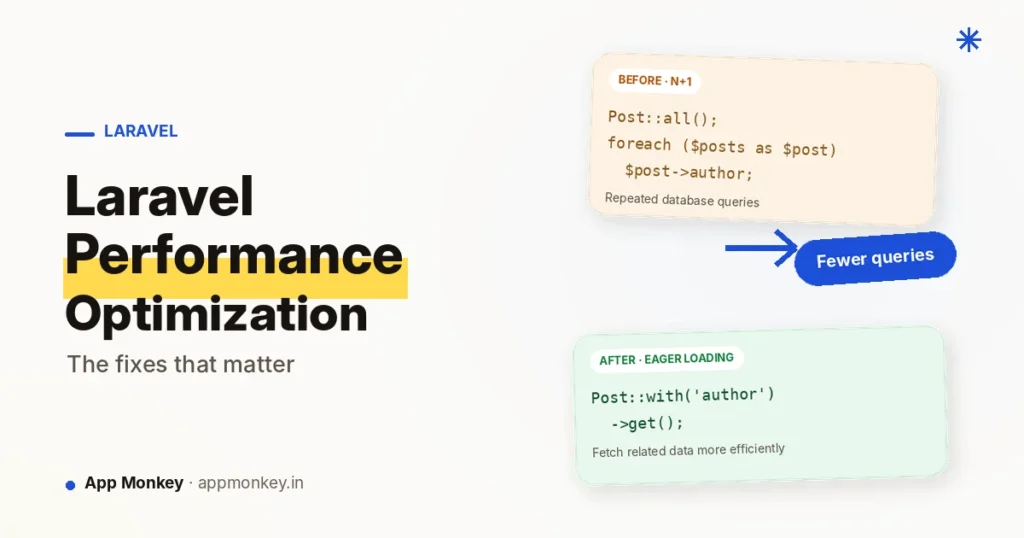
To speed up a slow Laravel app, find what is slow before you change anything, then fix the usual causes in order: N+1 queries, missing database indexes, expensive results you recompute on every request, work that belongs in a queue, and a deployment that skips Laravel's built-in caches. Each fix below comes with code from Laravel's own documentation.
The order matters. The first few fixes are cheap and apply to almost every app. Heavier tools like Octane come last, because they change how your code has to behave.
Last checked against the Laravel 13.x documentation: October 29, 2026.
1. Measure before you optimise
Guessing is the most common way to waste a day on Laravel performance. Before you change code, find out which queries and routes are actually slow.
Laravel Pulse is a first-party package that shows performance and usage at a glance. Its storage needs MySQL, MariaDB or PostgreSQL. Install it with:
composer require laravel/pulse
php artisan vendor:publish --provider="Laravel\Pulse\PulseServiceProvider"
php artisan migrate
The dashboard is then at /pulse. By default it is only available in the local environment; for production, define the viewPulse gate in AppServiceProvider:
Gate::define('viewPulse', function (User $user) {
    return $user->isAdmin();
});
Three cards do most of the work for this guide:
- Slow Queries lists queries over the threshold (1,000 ms by default), grouped by SQL and location.
- Slow Requests lists requests over the threshold (also 1,000 ms by default).
- Slow Jobs lists queued jobs over the threshold.
You can set different thresholds for different routes or queries in config/pulse.php:
Recorders\SlowRequests::class => [
    'threshold' => [
        '#^/admin/#' => 5000,
        'default' => env('PULSE_SLOW_REQUESTS_THRESHOLD', 1000),
    ],
],
Write down a baseline before you start: the response time of your two or three slowest routes and how many queries each runs. You will compare against it after each fix.
On a busy site, Pulse's own overhead matters. The docs suggest storing its data in a separate database, ingesting through Redis, or lowering a recorder's sample rate. For digging into a single request or event, the docs point to Laravel Telescope instead.
2. Fix N+1 queries
An N+1 query happens when your code loads a list of records and then runs one more query per record to fetch a relationship. It is easy to write by accident because Eloquent relationships load lazily.
The Laravel docs show it with books and authors:
$books = Book::all();

foreach ($books as $book) {
    echo $book->author->name;
}
With 25 books, that runs 26 queries: one for the books and one per book for its author. Eager loading with with() cuts it to two:
$books = Book::with('author')->get();

foreach ($books as $book) {
    echo $book->author->name;
}
You can eager load several relationships, or nested ones, with the same method:
$books = Book::with(['author', 'publisher'])->get();

$books = Book::with('author.contacts')->get();
Make mistakes fail loudly
It is better to catch these while developing than in production. Laravel can throw an exception whenever a relationship is lazy loaded. Add this to the boot method of AppServiceProvider so it only runs outside production:
use Illuminate\Database\Eloquent\Model;

public function boot(): void
{
    Model::preventLazyLoading(! $this->app->isProduction());
}
If you would rather log violations than throw, the docs show handleLazyLoadingViolationUsing. There is also an automatic option: calling Model::automaticallyEagerLoadRelationships() makes Laravel lazy eager load a relationship across the whole collection the first time you access it. It is convenient, but explicit with() calls keep your queries easy to read and review.
3. Add the right database indexes
If Pulse shows a slow query that filters or sorts a large table, the next suspect is a missing index. As a general rule, the columns worth indexing are the ones your queries filter, sort or join on. Run your database's EXPLAIN on the slow query to confirm before you add anything.
Add indexes in a new migration. The migrations docs show the methods:
$table->index('state');

// A compound index, for queries that filter on both columns
$table->index(['account_id', 'created_at']);

// Unique values
$table->string('email')->unique();
A full migration looks like this:
Schema::table('orders', function (Blueprint $table) {
    $table->index(['account_id', 'created_at']);
});
Two cautions from the docs. First, creating an index on a large table can lock it and block reads and writes. On PostgreSQL or SQL Server you can add ->online() to avoid that; on MySQL, ->inplace() uses the in-place algorithm and can be combined with ->lock('none'). Second, an index is not free: every extra index adds work to writes, so index what your slow queries need, not every column.
4. Load fewer columns and fewer rows
The cheapest data to process is data you never fetch.
Fetch only the columns you need. When you eager load a relationship, you can name its columns. The docs say to always include id and any foreign keys:
$books = Book::with('author:id,name')->get();Paginate instead of loading everything. Laravel has three pagination methods with different costs:
| Method | Count query? | Navigation | Use it when |
|---|---|---|---|
paginate | Yes | Page numbers and next/previous | Users need page numbers or a total |
simplePaginate | No | Next/previous only | Next and previous links are enough |
cursorPaginate | No | Next/previous only | Large tables or infinite scroll |
$users = User::paginate(15);
$users = User::where('votes', '>', 100)->simplePaginate(15);
$users = User::where('votes', '>', 100)->cursorPaginate(15);
paginate runs an extra query to count the total number of matching records. cursorPaginate avoids that and is the most efficient of the three according to the docs, but it has strict rules: the query must have an orderBy on at least one unique column, columns with null values are not supported, and it only gives next/previous links.
5. Cache expensive results
Some results are costly to build and change rarely: a leaderboard, a count, a menu, a report. Compute them once and reuse the answer. Laravel's Cache::remember does exactly that. If the key is not cached, the closure runs and its result is stored:
use Illuminate\Support\Facades\Cache;

$topPosts = Cache::remember('top-posts', 600, function () {
    return Post::withCount('comments')
        ->orderByDesc('comments_count')
        ->limit(10)
        ->get();
});
The second argument is the lifetime in seconds, so this result can be up to ten minutes old. When the underlying data changes and you cannot wait, remove the key with Cache::forget('top-posts').
Pick the right cache driver
The cache docs list the drivers. Choose one in config/cache.php or with an environment variable:
CACHE_STORE=redis- The default store is
database, which keeps serialised items in a table. It needs no extra software; for a busy site, many teams move to Redis or Memcached. - Redis needs the PhpRedis extension or the
predis/predispackage. Memcached needs its PECL extension. arrayandnullare for tests, not production.- Cache tags are not supported by the
file,database,dynamodborstoragedrivers, so choose Redis or Memcached if you rely on them. Cache::flush()ignores the key prefix and removes every entry, so avoid it when the cache is shared with other applications.
6. Optimise on every deploy
Laravel can cache files it would otherwise rebuild on every request. The deployment docs say to run one command as part of your deployment process:
php artisan optimizeIt caches your configuration, events, routes and views. You can also run each one on its own:
| Command | What it does |
|---|---|
php artisan config:cache | Combines all config files into one cached file, so fewer files are read per request |
php artisan route:cache | Reduces route registration to a single cached call; the docs recommend it for large apps with many routes |
php artisan view:cache | Precompiles all Blade views so they are not compiled on demand |
php artisan event:cache | Caches the discovered event-to-listener mappings |
Two things catch people out:
env()stops working outside config files. Once config is cached, the.envfile is not loaded and everyenv()call returnsnull. Callenv()only inside files inconfig/, and read values elsewhere withconfig('app.name').optimize:cleardoes more than you expect. It removes the filesoptimizecreated, and also all keys in your default cache driver. Do not run it casually on a production cache you rely on.
On production, also set APP_DEBUG=false. The docs warn that leaving debug mode on risks exposing sensitive configuration values to users.
7. Move slow work to queues
If a request sends an email, resizes an image or calls a slow API, the visitor waits for all of it. A queue lets the request finish first and a background worker do the rest. The queues docs put it this way: moving time-intensive tasks to a queue lets your app respond to web requests quickly.
Generate a job class:
php artisan make:job ProcessPodcastThe generated class implements ShouldQueue and has a handle method that holds the slow work:
class ProcessPodcast implements ShouldQueue
{
    use Queueable;

    public function handle(): void
    {
        // Process uploaded podcast...
    }
}
Dispatch it from your controller. The request returns immediately:
ProcessPodcast::dispatch($podcast);Then run a worker to process the jobs:
php artisan queue:workThe worker keeps running until you stop it, so in production keep it alive with a process manager. Laravel supports several queue backends: a database table, Redis, Amazon SQS and Beanstalkd. The sync driver runs jobs immediately and is meant for development and testing, not for speed.
Workers keep your application in memory, so restart them after each deployment. The deployment docs say to run php artisan reload to restart long-running services such as queue workers.
Watch the Slow Jobs card in Pulse to see which jobs need attention.
8. Check that OPcache is on
PHP normally has to read and compile your code on each request. OPcache is PHP's built-in opcode cache: it keeps compiled code in shared memory so that work is skipped. The PHP manual lists these defaults:
| Setting | Default | What it does |
|---|---|---|
opcache.enable | 1 | Turns the opcode cache on. When off, code is not optimised or cached |
opcache.memory_consumption | 128 | Size of the shared memory, in megabytes |
opcache.validate_timestamps | 1 | Checks files for changes every opcache.revalidate_freq seconds |
Check the setting on the server that actually serves your site, not only on the command line, because the command-line and web configurations can differ. Ask your host if you cannot see the config.
If you turn validate_timestamps off for speed, PHP stops noticing code changes. You must then reset OPcache after each deployment, either with opcache_reset(), with opcache_invalidate(), or by restarting the web server, as the manual explains. Many hosts and deploy tools handle this for you; check yours before changing it.
9. Ship front-end assets properly
Part of "my Laravel site is slow" is the browser downloading heavy, uncached JavaScript and CSS. If you use Vite, the Laravel docs cover the production steps.
Build for production, which bundles and versions your assets:
npm run buildVersioned file names let browsers cache assets safely, because a changed file gets a new name. Load them with the @vite directive in your layout, which uses the compiled, versioned files in build mode:
@vite(['resources/css/app.css', 'resources/js/app.js'])If you build a single-page app with code splitting, assets are fetched on each page navigation, which can delay rendering. Laravel can prefetch them. Add this to a service provider's boot method:
use Illuminate\Support\Facades\Vite;

public function boot(): void
{
    Vite::prefetch(concurrency: 3);
}
That prefetches assets with at most three concurrent downloads on each page load.
Images and server compression sit outside Laravel. As general advice, resize and compress images before you upload them, and test the result with PageSpeed Insights.
10. When Octane is worth it
Only reach for Laravel Octane after the fixes above. It boots your application once, keeps it in memory and feeds it requests, so Laravel does not rebuild itself on every request. That is where its speed-up comes from. The cost is that your code now runs in a long-lived process.
Install it and choose a server:
composer require laravel/octane
php artisan octane:install
Octane supports FrankenPHP, RoadRunner and Swoole. Start it with php artisan octane:start; it runs one worker per CPU core by default and restarts each worker after 500 requests to limit memory leaks.
What can go wrong
Because state survives between requests, the docs warn about a few patterns:
- Memory leaks. Appending to a static array on every request grows forever:
// Leaks: every request appends to the static array
Service::$data[] = Str::random(10);- Injecting the container, request or config into a singleton. The singleton keeps the first request's values and misses later changes. Pass what you need at call time, or resolve it through a closure.
- Stale code. Code changes are not picked up until the server restarts, so run
php artisan octane:reloadafter each deployment.
Test your app under Octane before moving production traffic, and watch memory use.
Deployment checklist
A short list of what to run or check each time you deploy a Laravel app:
| Step | Command or action | Why |
|---|---|---|
| Debug off | APP_DEBUG=false in production | Avoids exposing configuration values |
| Cache config, events, routes, views | php artisan optimize | Fewer files read and less work per request |
| Restart long-running services | php artisan reload | Queue workers and Octane keep old code in memory |
| Octane only: reload workers | php artisan octane:reload | Code changes are not picked up otherwise |
| Build assets | npm run build | Bundled, versioned front-end files |
| OPcache | Reset it if validate_timestamps is off | PHP otherwise keeps serving old compiled code |
| Check Pulse | Open /pulse after the deploy | Catch new slow queries and requests early |
| Undo the caches | php artisan optimize:clear | Also clears your default cache driver, so use with care |
FAQ
Where do I start with a slow Laravel app?
Measure first. Install Laravel Pulse, find the slowest queries and routes, and fix the worst one. Then work down the list: N+1 queries, indexes, caching, queues, deploy caches.
Does php artisan optimize make Laravel faster?
It caches your config, events, routes and views so Laravel does less work on each request. Run it as part of every production deployment, not in local development, where cached config would hide your changes.
Is Laravel Octane worth it?
It can remove the cost of booting the framework on every request, but it changes how your code must behave, because state is shared between requests. Fix queries and caching first, then test Octane carefully.
Which cache driver should I use?
Redis or Memcached are the usual choices for production. The default database store works without extra software, and file, database, dynamodb and storage do not support cache tags.
Why does env() return null after I cache my config?
Once config is cached, the .env file is no longer loaded. Call env() only inside files in config/, and read values everywhere else with config().
How do I find N+1 queries?
Turn on Model::preventLazyLoading() outside production so lazy loading throws an exception, and check the Slow Queries card in Pulse.




Join the conversation
What do you think?
Write a comment
No comments yet. Be the first to share a thought.